Planowanie i materiały
Ustal, co kupić, a co wyprodukować
MRP rozwija struktury wyrobów poziom po poziomie i bilansuje je ze stanami i dostawami w drodze. Niedobory stają się wyjątkami.
- Chair-A
- Seat
- Frame
- Screw M6
- ŚredniBracket B-2Niedobór · 12 szt.
- WysokiScrew M6Niedobór · 480 szt.
- Brutto
- 500
- Zapas bezpieczeństwa
- + 50
- Stan dostępny
- − 320
- Dostawy w drodze
- − 100
- Netto
- 130
Zapotrzebowanie na 500 krzeseł wchodzi do przebiegu.
Co robi
- 01
Bilansowanie wielopoziomowe
Zapotrzebowanie netto to brutto plus zapas bezpieczeństwa, minus stan dostępny i dostawy w drodze. Reguły partii ustalają wielkość zlecenia.
- 02
Niedobory jako wyjątki
Każdy niedobór staje się wyjątkiem ważonym według terminu potrzeby i czasu dostawy. Planista go akceptuje, pomija, odkłada lub zamyka.
- 03
Zlecenia z wyniku
Jedno polecenie generuje propozycje zamówień zakupu pogrupowane według preferowanego dostawcy albo zapotrzebowania produkcyjne do kolejki planisty.
Zobacz, jak to działa
Film jest po angielsku; napisy są dostępne w odtwarzaczu.
Transkrypcja (po angielsku)
This is the Bill of Materials screen in IRIS MRP. It lists every BOM with its product, version, lines, total cost and status. Use the status filter to show active or draft BOMs, and export the list to Excel or CSV. Create BOM starts a new one. An active BOM has the action Withdraw, and a draft has Activate. Next to BOM you will find Item master and Costing. Open Planning to see the MRP runs. Each run shows its status, start time, items, planned orders and exceptions. Run MRP starts a new run. Open Demand to see what the plant has to produce. Each line shows the SKU, source, quantity, required date, priority and status. Add Demand creates a new line, and the filters narrow the list by source or status. That is enough to get started. Overview, with the dashboard and the exceptions, is in the same module, so look around there too.
Transkrypcja (po angielsku)
A plan that ignores stock and capacity breaks on day one. When materials, machines and the warehouse are planned apart, the plan stops matching reality. In IRIS MRP, every bill of materials lists its product, version, lines and cost. An MRP run shows its items, planned orders and exceptions. APS lists your resources and their capacity, and shows the load and the bottlenecks. WMS shows the stock, the receiving and the picking in the warehouse. Planning and stock stay on the same plant data. Try the free demo at iris.dbr77.com.
Skąd pochodzą dane
- Ręcznie lub przez API: pozycje, struktury wyrobów, popyt, zapasy bezpieczeństwa i koszty.
- WMS dostarcza stany dostępne. Bez niego przebieg się nie uruchomi.
- Zakupy dostarczają otwarte zamówienia zakupu. MES potwierdza zlecenia produkcyjne i zgłasza ich status.
Warto wiedzieć
- Przebieg podaje, ile zamówić lub wyprodukować, ale nie wyznacza terminu zwolnienia. O terminie decyduje planista.
- MRP nie kupuje. Zamówienia zatwierdza się i wysyła w Zakupach, osobnym module z własną licencją.
- MRP nie układa harmonogramu maszyn. Planista zatwierdza każde zapotrzebowanie produkcyjne, zanim MES utworzy zlecenie.
Ekrany z dema IRIS
Przykładowe dane z fabryki demonstracyjnej IRIS. Kliknij ekran, aby go powiększyć.
Czytaj więcej
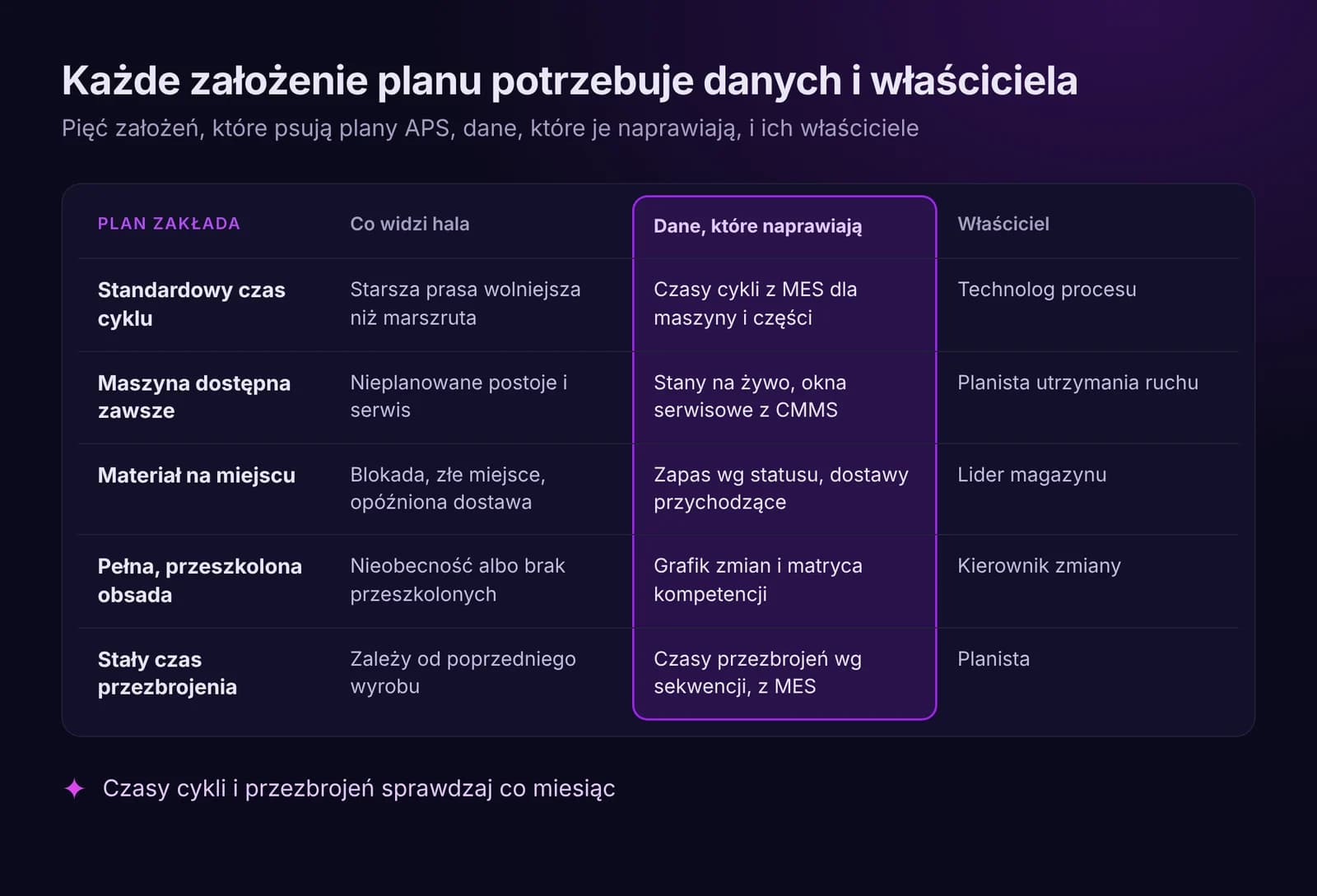
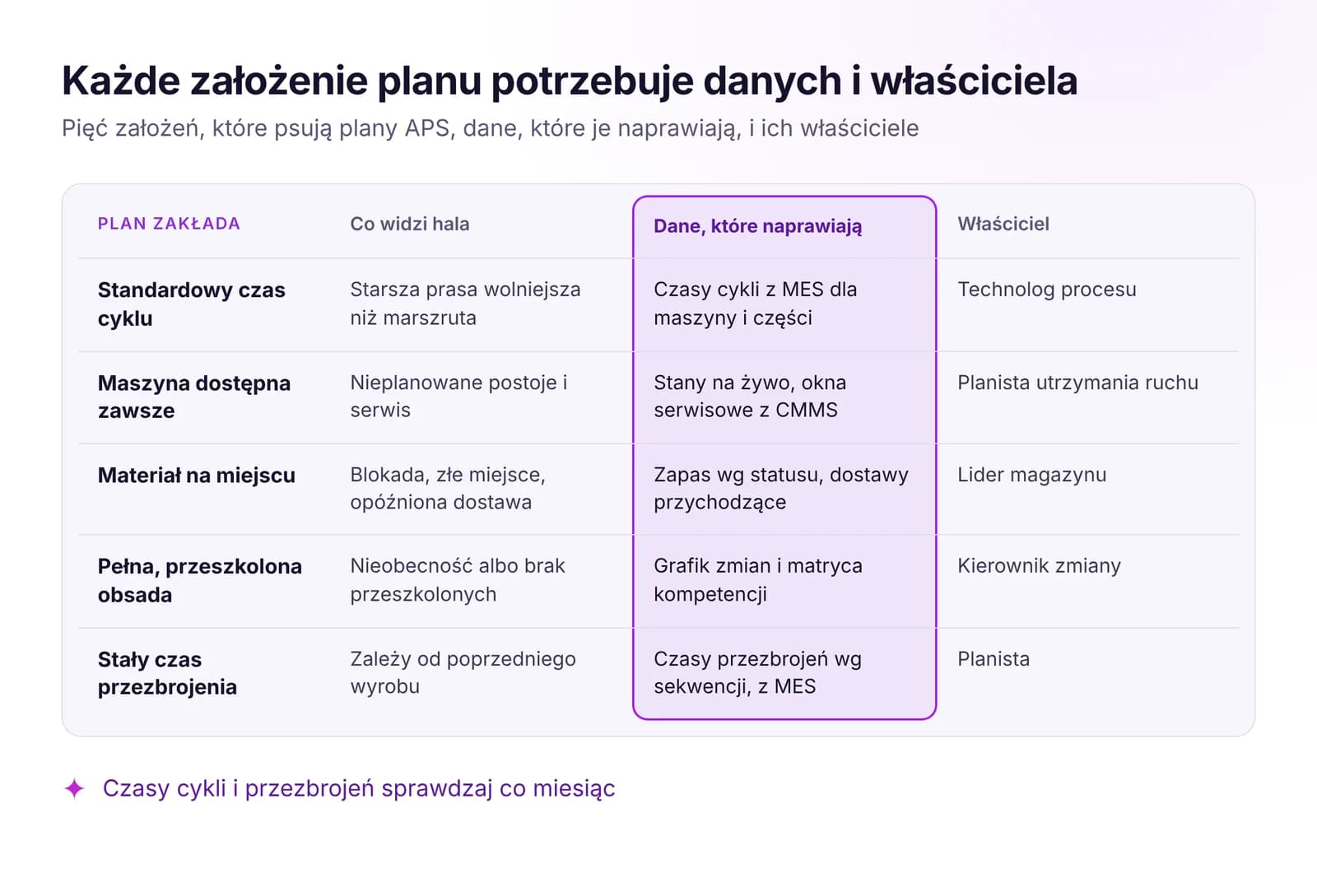 Planowanie produkcji a rzeczywistość: dlaczego plany APS zawodząPlany APS zawodzą przez stare założenia o czasach cykli, maszynach, materiale i obsadzie. Jakie dane na żywo utrzymują plan aktualny i kiedy go zmieniać.Przeczytaj artykuł · 6 min
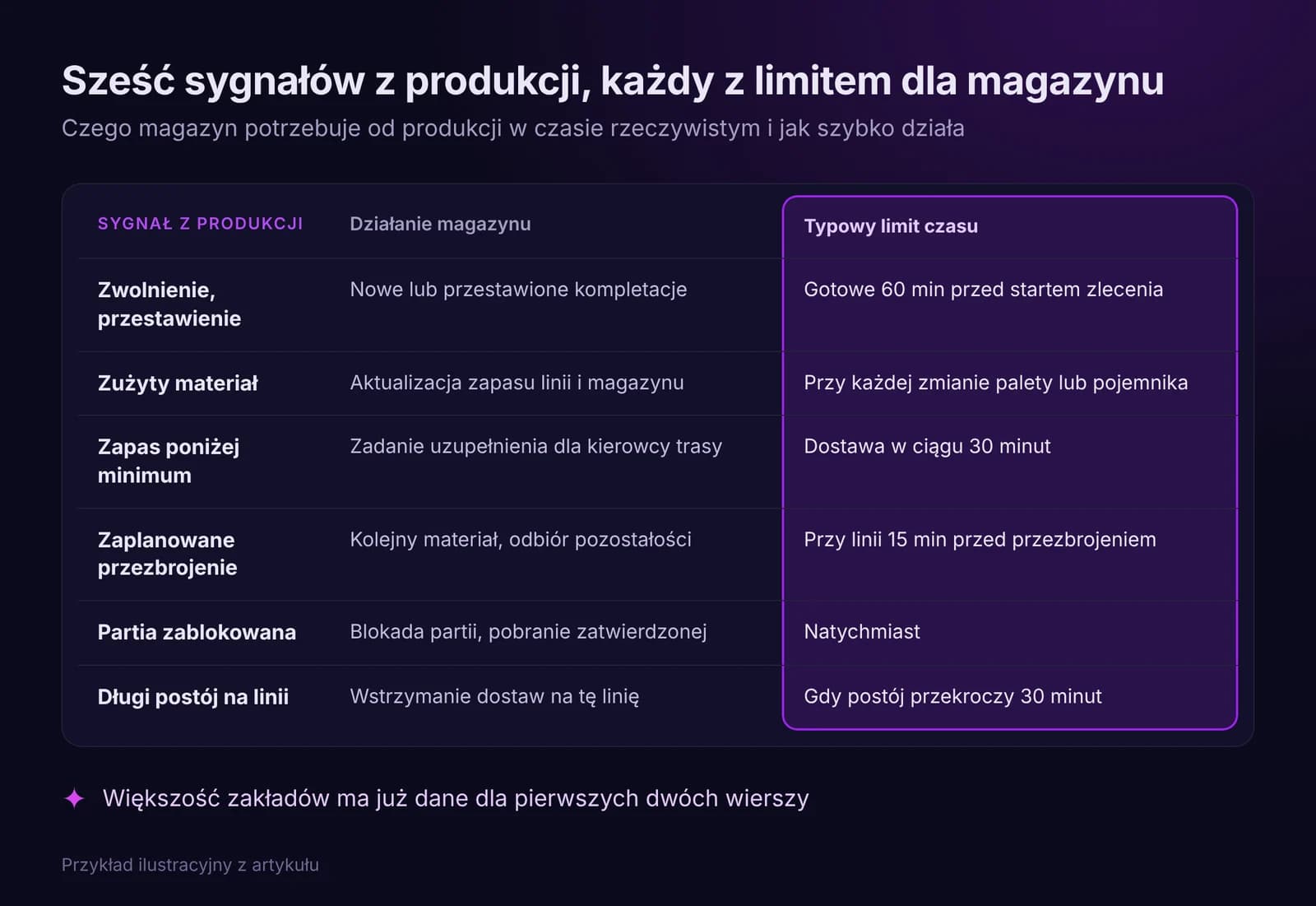
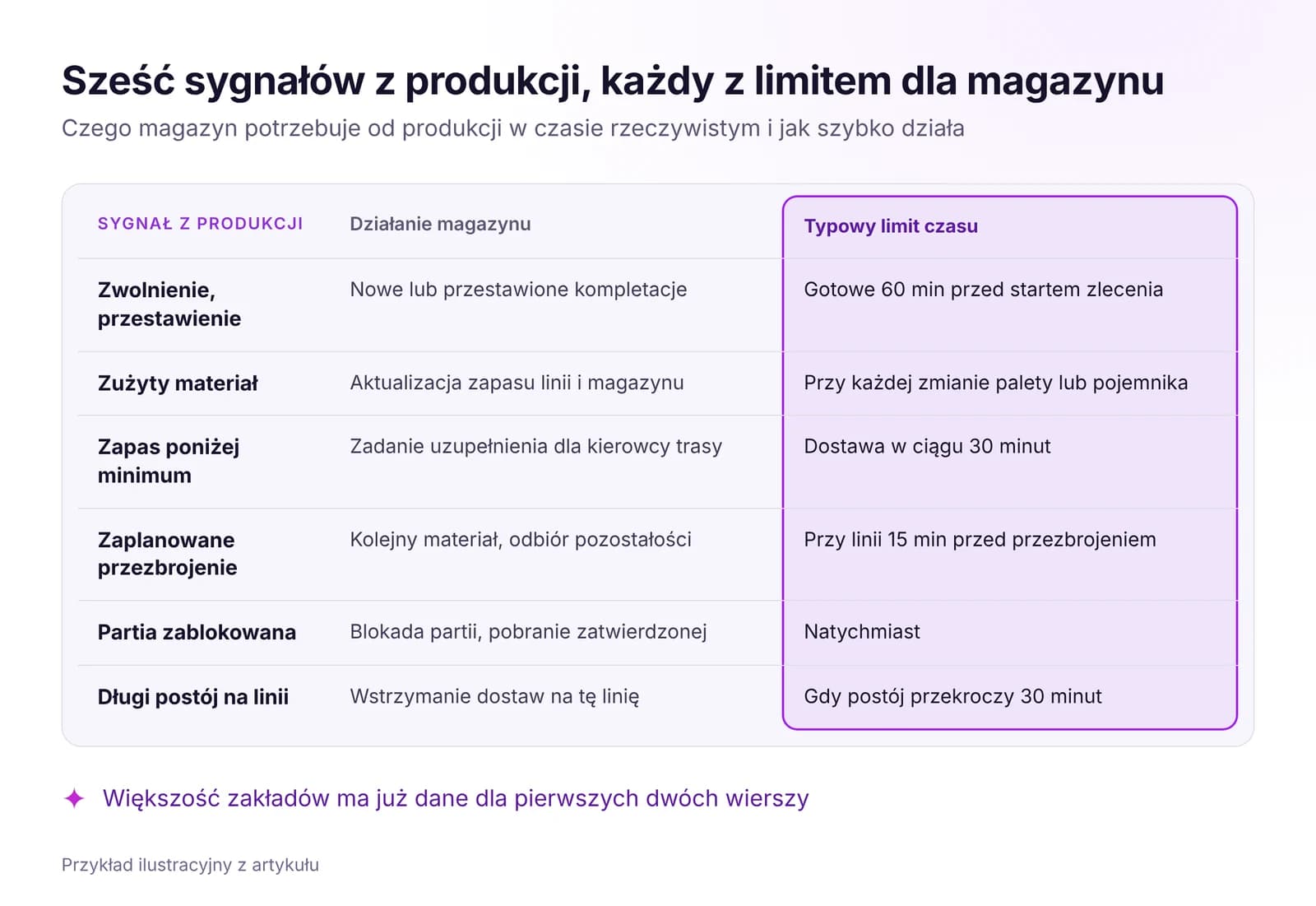 Optymalizacja magazynu i intralogistyki na podstawie danych w czasie rzeczywistymLinia czeka na materiał, gdy magazyn za późno widzi produkcję. Jakich sygnałów potrzebuje WMS, jak zorganizować zasilanie linii w systemie ssącym i co mierzyć.Przeczytaj artykuł · 7 min
Wypróbuj moduł MRP w IRIS
Rozpocznij 14-dniowy okres próbny na danych swojego zakładu albo otwórz interaktywne demo z przykładowymi danymi.