計画と資材
ジョブを機械に割り付け、MESに公開
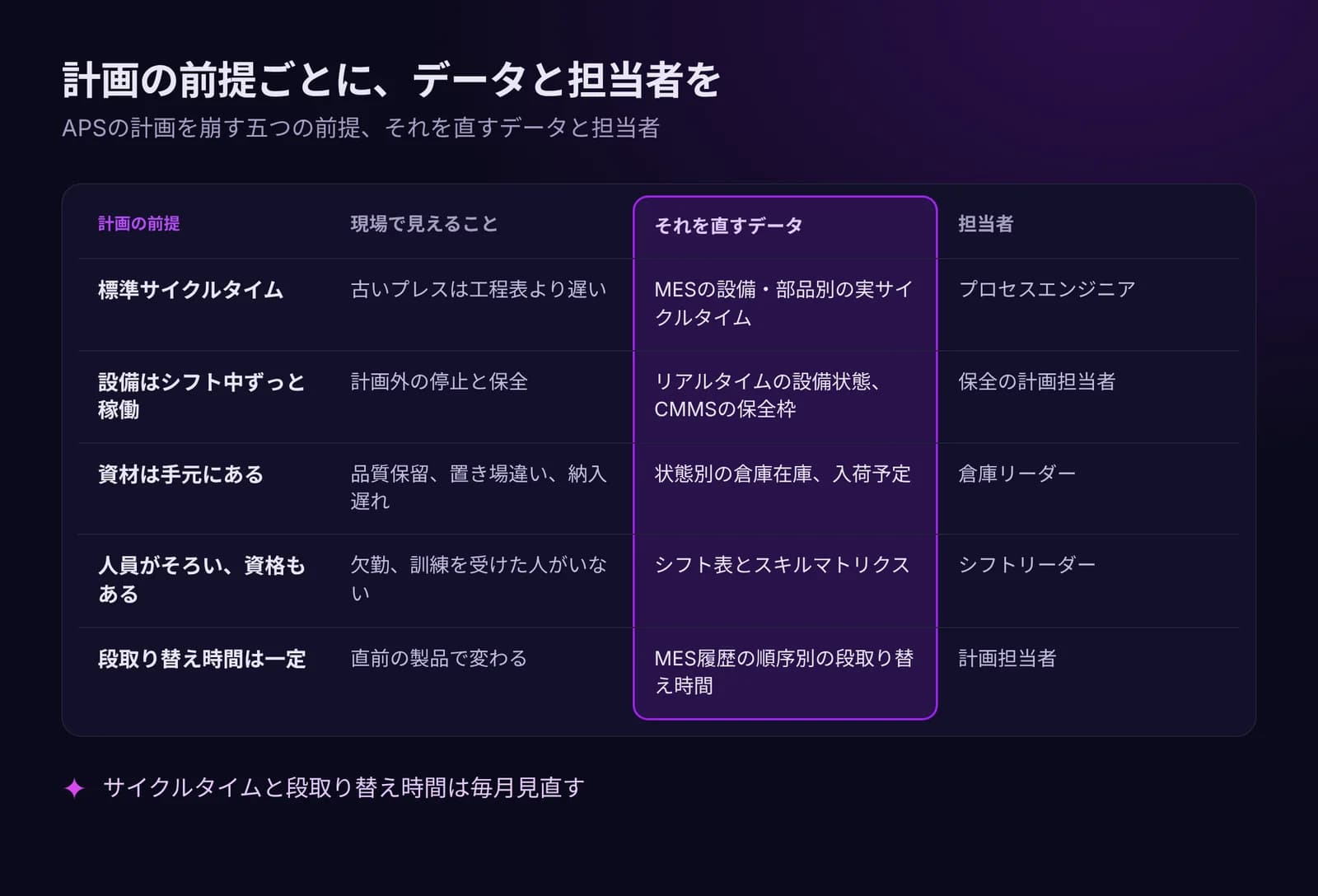
APSは基準生産計画(MPS)をガントチャートの計画に展開し、負荷超過の機械を示して、公開した版だけをMESに送ります。
- 1下書き
- 2確定
- 3公開済み
工場の負荷上限を超過。
MES 生産がオーダーを受け取ります。
計画担当者がスケジュールの目標を選びます。
主な機能
- 01
目標に応じたスケジューリング
納期遅れ最小、稼働率最大、コスト最小から選べます。段取り時間は段取り替えマトリクスから取得します。
- 02
ボトルネックとデータ不足
工場で設定した負荷上限を超える機械にフラグが立ちます。データが足りない場合は、計画にそう表示されます。
- 03
版管理と計画遵守
計画は下書き、確定、公開の順に進みます。計画遵守率は、完了したジョブの計画日と実績日を比べて出します。
動作を見る
動画は英語のナレーションです。字幕はプレーヤーで利用できます。
文字起こし(英語)
This is the Resources screen in IRIS APS. It lists each resource with its code, name, type, capacity, linked machine and bottleneck flag. Click a column title to sort, and export the list to Excel or CSV. Add Resource creates a new one. Each row has the actions Edit and Delete. The tabs next to Resources cover resource capacity, load balance, bottlenecks and the setup matrix. Open Scheduling for the Gantt chart. Use Prev, Today and Next, and the Day, Week or Month view, to move through time. The buttons Create Entry, Dependencies and Record actuals are above the chart. Scenarios, Publish and Adherence are next to Gantt. That is enough to get started. Overview, Demand and Material, and Settings are in the same module, so look around there too.
文字起こし(英語)
A plan that ignores stock and capacity breaks on day one. When materials, machines and the warehouse are planned apart, the plan stops matching reality. In IRIS MRP, every bill of materials lists its product, version, lines and cost. An MRP run shows its items, planned orders and exceptions. APS lists your resources and their capacity, and shows the load and the bottlenecks. WMS shows the stock, the receiving and the picking in the warehouse. Planning and stock stay on the same plant data. Try the free demo at iris.dbr77.com.
データの取得元
- 計画担当者の入力:リソース、能力カレンダー、段取り替えマトリクス、MPS品目、需要予測、設定。
- MRPとWMS:資材制約に使うBOMと在庫数。
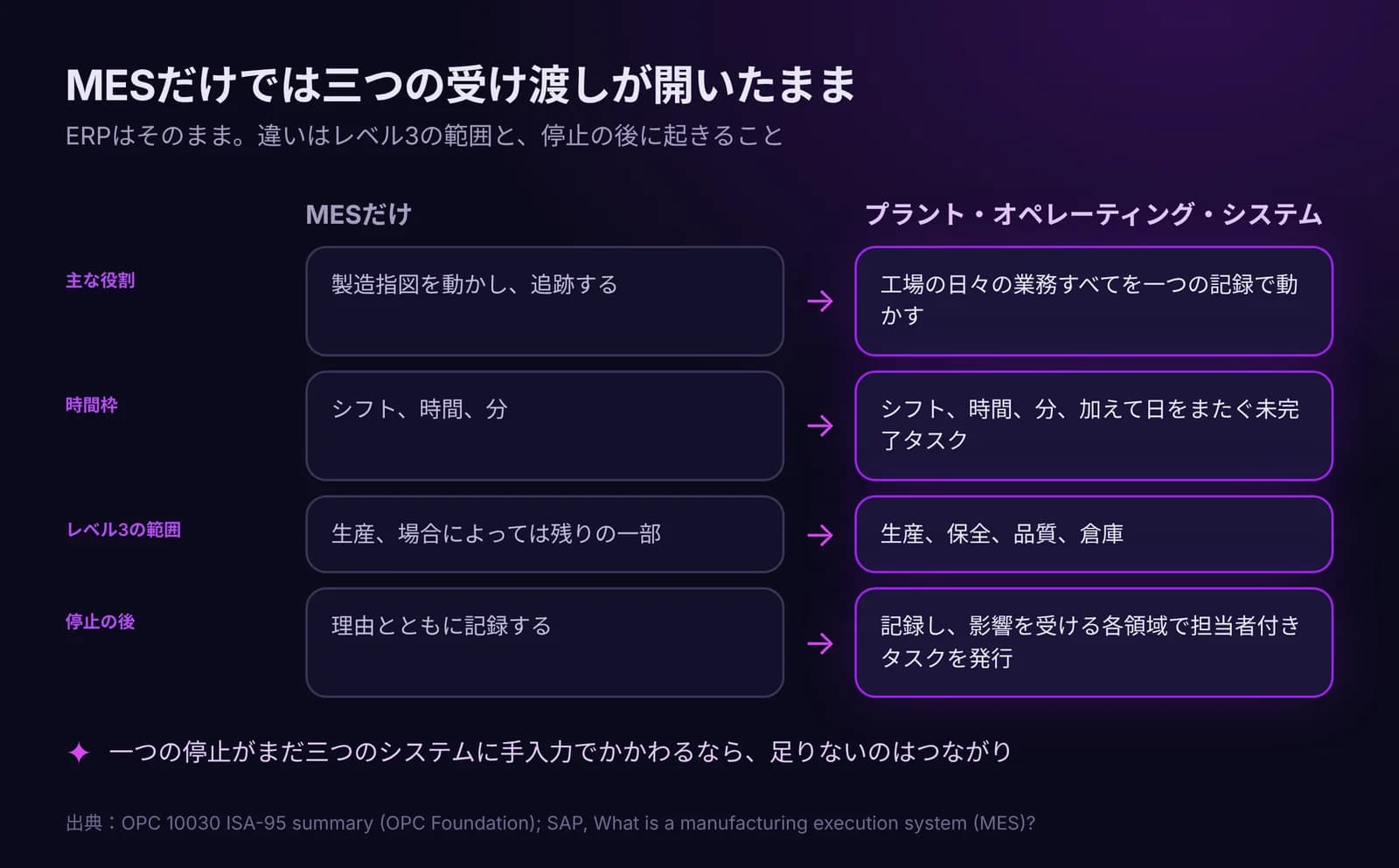
- MESがジョブを完了し、状況を報告します。CMMSで故障が登録されると、そのリソースは計画から外れます。
補足
- スケジューリングはルールベースで、全体最適化は行いません。1つのジョブは1台の機械上の1ブロックです。
- MESに届くのは公開済みの計画だけです。下書きや確定段階の計画は現場に表示されません。
- APSは資材の所要量を計算せず、発注もしません。それはMRPと調達の役割です。
IRISデモの画面
IRISデモ工場のサンプルデータです。画面をクリックすると拡大します。