التخطيط والمواد
تتبّع البضائع من الاستلام حتى الشحن
تسجّل WMS الاستلام والتخزين والمخزون والانتقاء والتعبئة والشحن. ويمر كل تغيير في المخزون عبر سجل حركات واحد.
- مجدولRCV-MES-1-2318من الأمر PO-2318
- منجزالتخزينالمنصة 1 إلى A-03-2
- قيد الانتقاءWave W-123 طلبات · مسار واحد
- مشحونSH-204ملصق GS1
يُنشأ عند انتهاء الإنتاج.
اختير الكرتون M
انتهاء الإنتاج ينشئ مستند استلام بحالة «مجدول».
ماذا تفعل
- 01
مستندات الاستلام والتخزين
عند انتهاء الإنتاج يُنشأ مستند استلام بحالة «مجدول». ثم يرسل التخزين كل منصة إلى موقعها.
- 02
الموجات والانتقاء والتعبئة
تجمع موجات الانتقاء الطلبات. وتعرض لوحة المنتقي مسارًا بنقاط توقف، وتختار WMS الكرتون عند التعبئة.
- 03
ملصقات GS1 وEPCIS
تُصدر أرقام SSCC من بادئة الشركة. وتسجّل الاستلامات المكتملة والشحنات المغادرة أحداث EPCIS تلقائيًا.
شاهده أثناء العمل
الفيديو بالإنجليزية، والترجمة متاحة في المشغّل.
النص المكتوب (بالإنجليزية)
This is the Inventory screen in IRIS WMS. The Stock tab lists every pallet with its SKU, quantity, unit and location. Click a column title to sort, and export the list to Excel or CSV. Next, open Lots and QC holds. Every lot shows its quality status. A held, quarantined or rejected lot drops out of picking until a QC decision releases it. Each lot has three actions: Hold, Release and Reject. Every decision needs a reason and is recorded in the lot history. The other tabs in this group cover movements, transfers, pallets, cycle counts and serial numbers. Goods arrive under Inbound. The Receiving tab lists every delivery with its supplier, warehouse, status and expected date. Use the status filter to narrow the list, and New delivery to register a new one. Goods leave under Outbound. The Picking tab lists the pick lists with their warehouse, strategy and status. Create pick list starts a new one. That is enough to get started. Production Supply and Terminals are worth a look too.
النص المكتوب (بالإنجليزية)
A plan that ignores stock and capacity breaks on day one. When materials, machines and the warehouse are planned apart, the plan stops matching reality. In IRIS MRP, every bill of materials lists its product, version, lines and cost. An MRP run shows its items, planned orders and exceptions. APS lists your resources and their capacity, and shows the load and the bottlenecks. WMS shows the stock, the receiving and the picking in the warehouse. Planning and stock stay on the same plant data. Try the free demo at iris.dbr77.com.
من أين تأتي البيانات
- يسجّل العاملون الاستلامات والتخزين والانتقاء والنقل والجرد على الشاشات أو على لوحة المنتقي.
- أحداث من الوحدات الأخرى: الإنتاج من MES، ونتائج الفحص من QMS، وأوامر MRP وProcurement.
- توفّر Data Bridge مناطق RTLS ومواقع مركبات AGV للخريطة الحية.
معلومات مفيدة
- ملصقات شركات النقل والتتبع تعمل في وضع الاختبار فقط، ويحتاج ربط شركة نقل إلى تنفيذ منفصل.
- لا تُصدر WMS مستند صرف ولا تزامن المخزون مع نظام ERP.
- يُحجز المخزون عند إنشاء قائمة الانتقاء، ولا تحجز WMS مقابل قائمة المواد.
شاشات من العرض التجريبي لـ IRIS
بيانات توضيحية من مصنع IRIS التجريبي. انقر على الشاشة لتكبيرها.
اقرأ المزيد

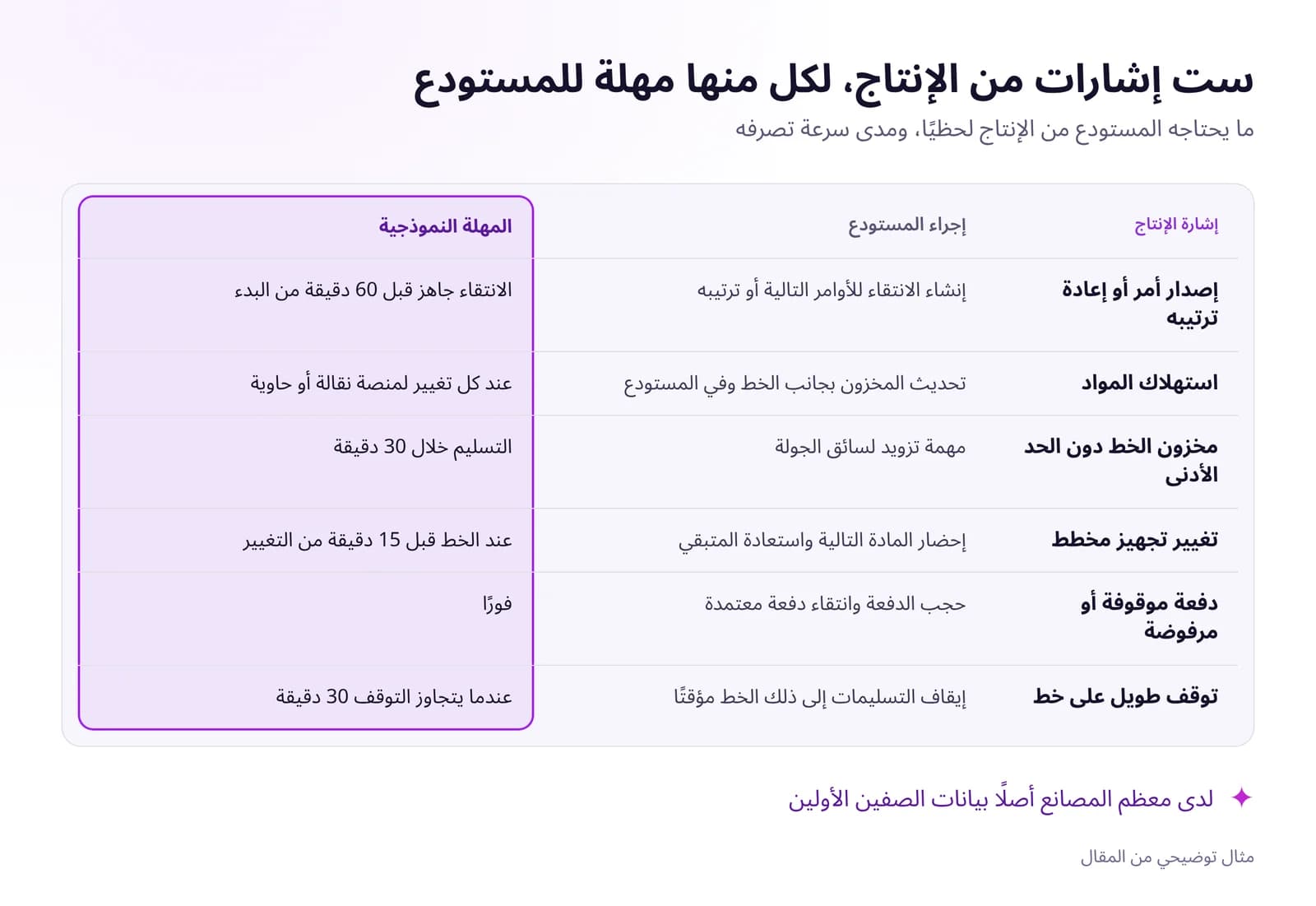 تحسين المستودع والخدمات اللوجستية الداخلية بالبيانات اللحظيةتنتظر خطوط الإنتاج المواد عندما يرى المستودع الإنتاج متأخرًا. الإشارات الفورية التي يحتاجها نظام WMS، وكيف تنظّم التزويد بالسحب، وما الذي تقيسه.اقرأ المقال · 6 د
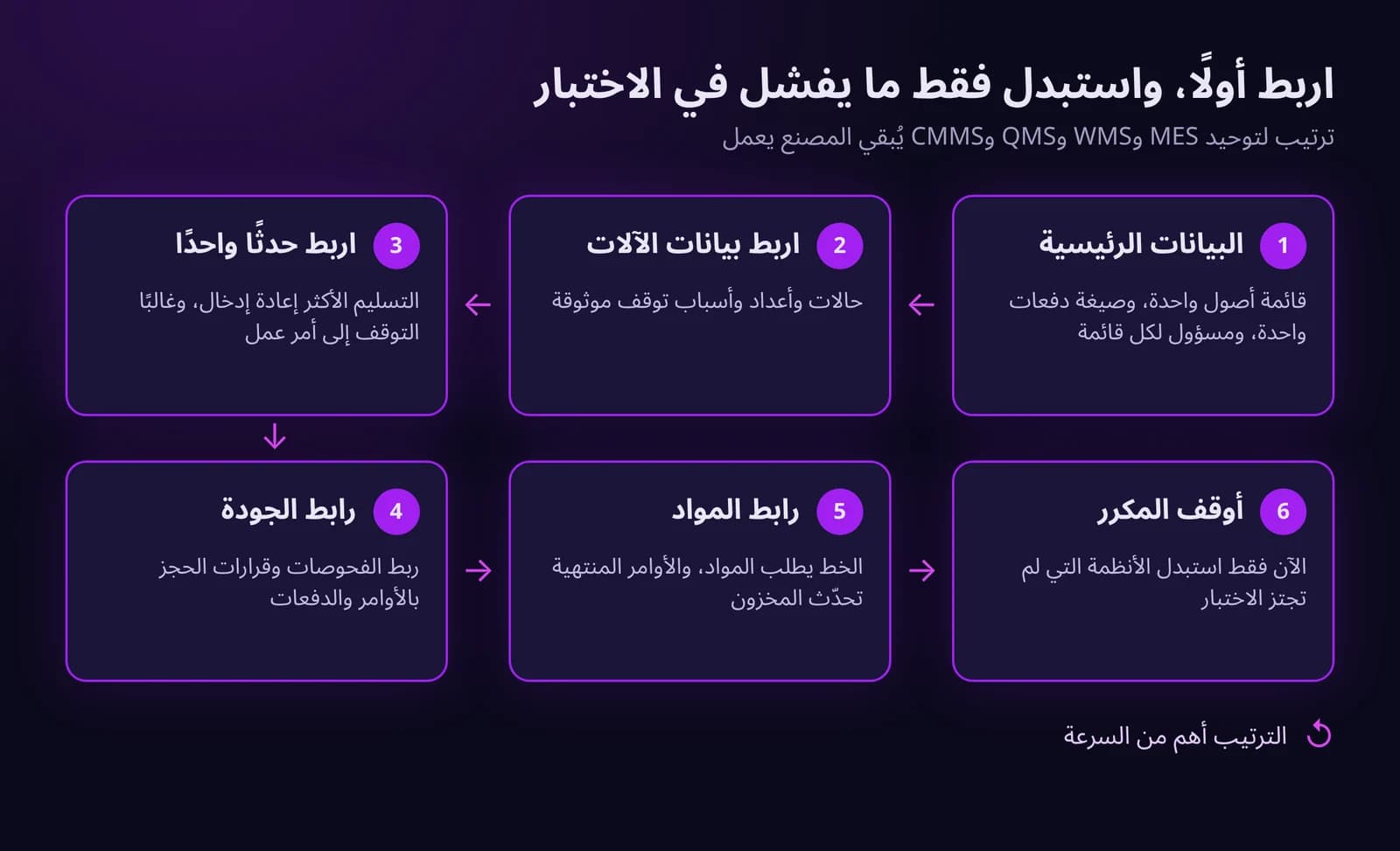
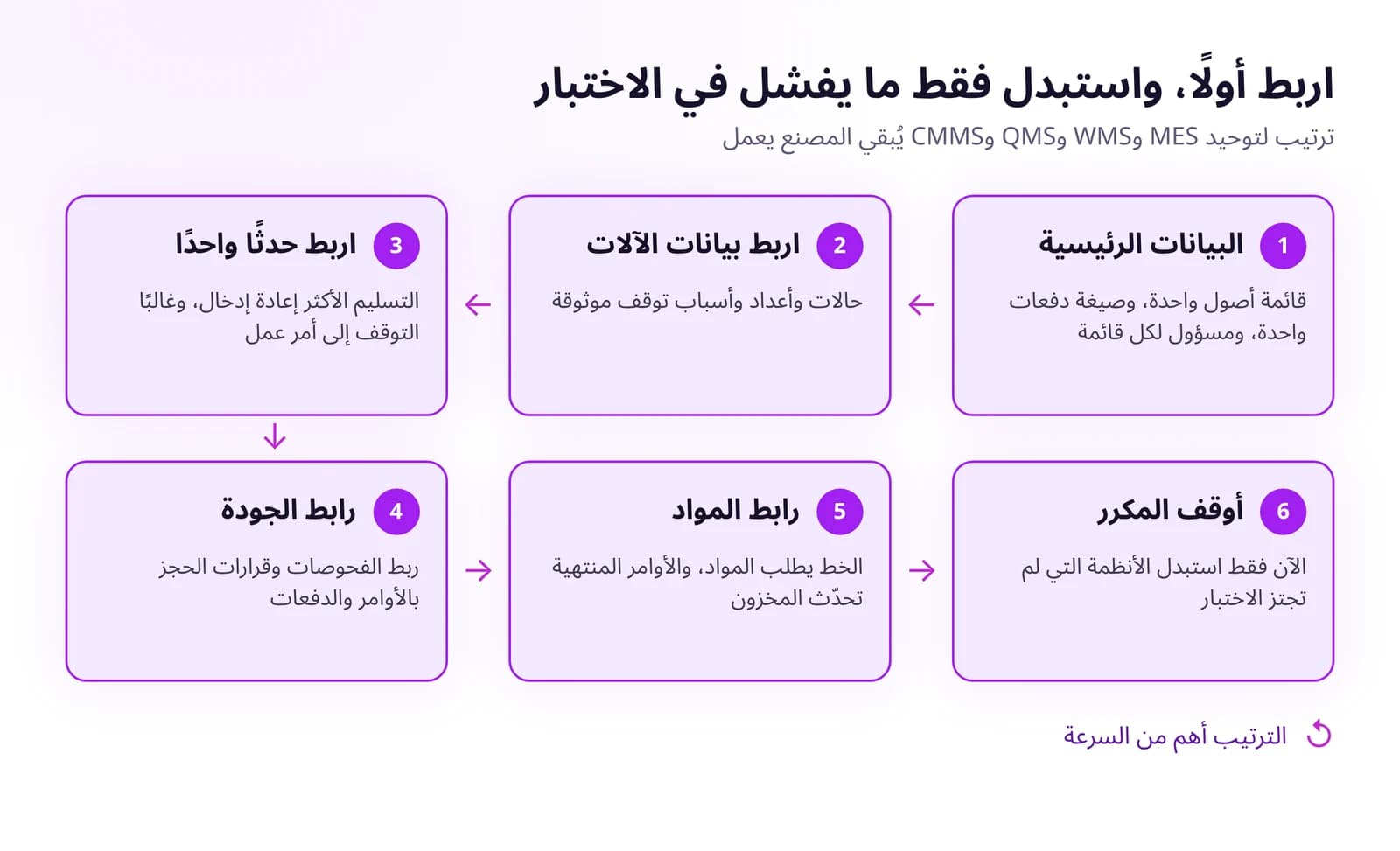 كيف توحّد أنظمة MES وWMS وQMS وCMMS دون استبدال كل شيءوحّد أنظمة MES وWMS وQMS وCMMS دون مشروع استبدال شامل: ابدأ ببيانات رئيسية مشتركة، ثم الأحداث الأساسية، واستبدل النظام فقط عندما يعرقل سير العمل.اقرأ المقال · 6 د
جرّب WMS في IRIS
ابدأ تجربة لمدة 14 يومًا على بيانات مصنعك، أو افتح العرض التفاعلي ببيانات توضيحية.